

Oracle Fusion, Oracle VBCS
Person Number Auto Generation by Business Unit in Oracle Fusion HCM Redwood

Oracle Fusion HCM provides standard functionality to automatically generate Person Numbers using a single enterprise-wide sequence. During an Oracle Fusion Redwood implementation, the business required each Business Unit to maintain its own Person Number sequence instead of sharing one common sequence.
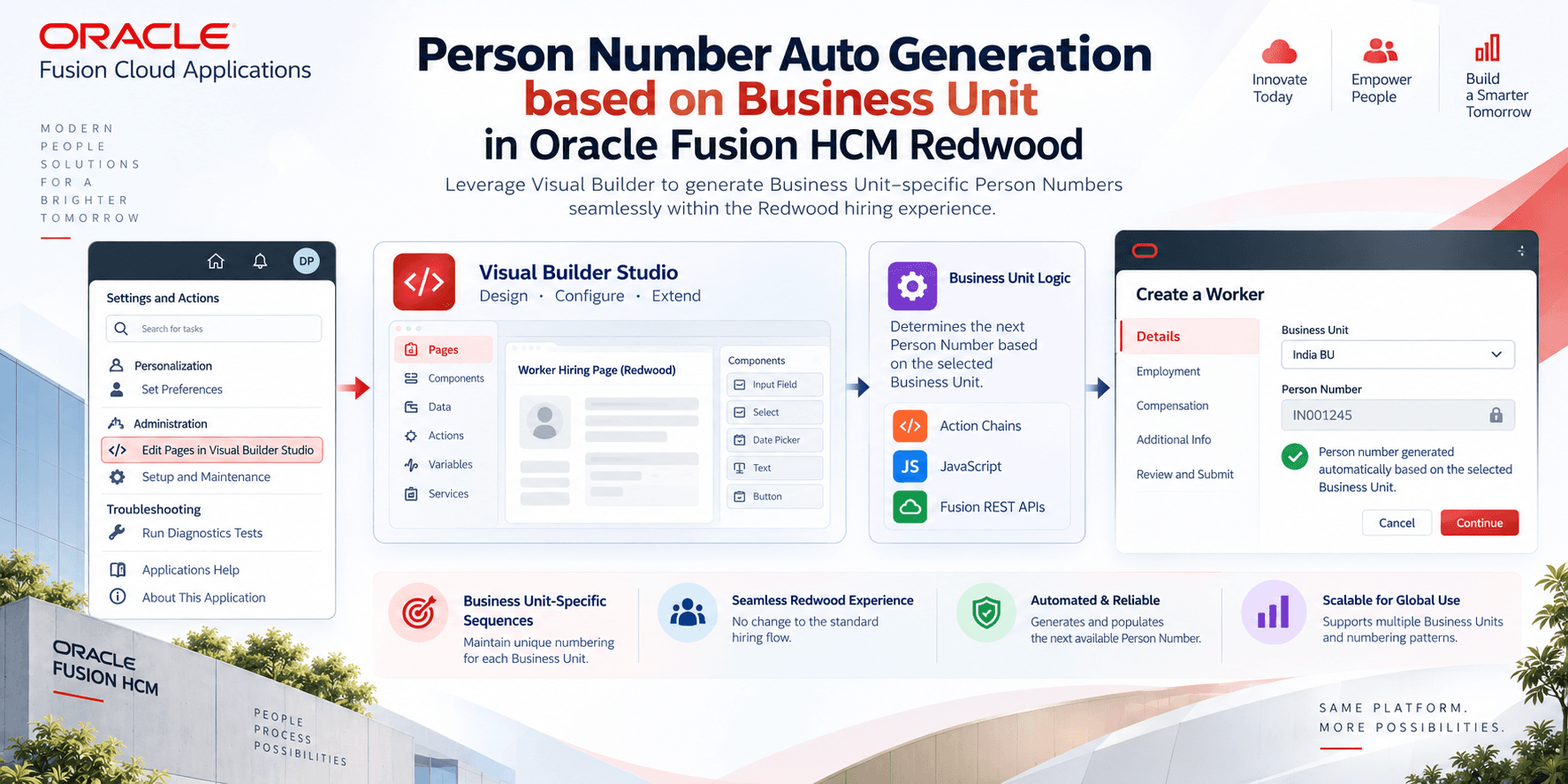
We customized the Redwood hiring pages using Visual Builder Action Chains, JavaScript and Oracle Fusion REST APIs. The solution generates the next available Person Number from the selected Business Unit and populates it during the hiring flow, while keeping the Redwood user experience unchanged.
Why was this customization required?
The requirement did not come from a technical limitation; it came from a business customization requirement. Standard Oracle Fusion can generate Person Numbers automatically, but it does not natively maintain multiple independent sequences by Business Unit in the Redwood hiring experience.
| Standard Oracle Fusion | Business requirement |
|---|---|
| Single automatic Person Number sequence | Separate sequence for each Business Unit |
| Common numbering logic across workers | BU-specific numbering standards |
| Minimal customization | Flexible numbering without changing the hiring experience |
Example scenario
| Business Unit | Generated Person Number |
|---|---|
| India Operations | IND10001 → IND10002 → IND10003 |
| UAE Operations | UAE50001 → UAE50002 → UAE50003 |
| US Operations | US200001 → US200002 → US200003 |
This allows each Business Unit to maintain its own numbering convention while users continue using the same Redwood pages.
Where does this customization work?
The same solution was implemented across multiple Redwood hiring flows:
- Hire an Employee
- Add Pending Worker
- Add Contingent Worker
- Add Nonworker
The user experience remains identical across all pages.
Technology stack
| Technology | Purpose |
|---|---|
| Oracle Fusion Redwood Page Extension | Customize Redwood hiring pages |
| Visual Builder Action Chain | Execute logic when a Business Unit is selected |
| JavaScript | Process API responses and populate the Person Number field |
| Oracle Fusion REST APIs | Retrieve existing workers and Person Numbers |
End-to-end workflow
Step 1 – HR user opens a Redwood hiring page
The HR user starts creating a worker using any supported Redwood page. At this point, no Person Number is entered manually.
Step 2 – Business Unit selection triggers the Action Chain
Once the Business Unit is selected, the Visual Builder Action Chain executes automatically. It captures the Business Unit value, invokes the REST API, waits for its response and passes that response to JavaScript. The process is completely automatic for HR users.
Step 3 – Fetch existing Person Numbers
The customization calls Oracle Fusion REST APIs to retrieve workers belonging to the selected Business Unit. Get Workers retrieves worker records and Person Numbers; Get Public Workers retrieves publicly available worker details where required. The response contains the existing Person Numbers for that Business Unit.
Step 4 – JavaScript generates the next sequence
- Extract all Person Numbers.
- Filter numbers for the selected Business Unit.
- Identify the highest numeric value.
- Increment by one.
- Attach a Business Unit prefix when configured.
| Business Unit | Highest Number | Generated Number |
|---|---|---|
| India | IND10003 | IND10004 |
| UAE | UAE50009 | UAE50010 |
| US | US200199 | US200200 |
The prefix is configurable according to business requirements.
Step 5 – Person Number is automatically populated
The generated Person Number is written back to the Redwood page before the worker is submitted. HR users do not need to type the number, use a lookup or perform a duplicate check.
Supporting multiple Business Unit sequences
This is the key difference between standard Oracle Fusion functionality and this customization approach.
| Business Unit | Numbering Pattern |
|---|---|
| India | IND10001, IND10002… |
| UAE | UAE50001, UAE50002… |
| Manufacturing | MFG70001, MFG70002… |
| Corporate | CORP90001, CORP90002… |
Because the sequence logic is driven through JavaScript and REST responses, additional Business Units can be introduced without changing the overall Redwood experience.
Duplicate generation handling
The customization retrieves the latest available Person Number, generates the next sequential value, applies validation before populating the field and uses implemented sequence logic to prevent duplicates when multiple HR users create workers at the same time.
Validation included
| Validation scenario | Behavior |
|---|---|
| REST API call fails | Display a validation or error message. |
| No workers returned for a Business Unit | Start the sequence from the configured initial value. |
| Invalid API response | Prevent auto-population until the response is valid. |
| Unexpected JavaScript exception | Show a controlled Redwood validation message. |
The goal is to avoid incomplete worker creation because of sequence-generation failures.
Advantages of this approach
| Redwood customization benefit | Business value |
|---|---|
| No modification of Oracle standard objects | Easier to maintain during Oracle updates. |
| Business Unit-specific numbering | Supports enterprise-specific HR policies. |
| Reusable Action Chain logic | Works across multiple Redwood hiring pages. |
| JavaScript-based transformation | Flexible prefix and sequence generation. |
| REST API-driven solution | Uses Oracle Fusion as the source of worker information. |
Frequently asked questions
Does Oracle Fusion already support automatic Person Number generation?
Yes. This customization addresses the requirement for multiple independent Business Unit sequences.
Which Redwood pages support this customization?
Hire Employee, Add Pending Worker, Add Contingent Worker and Add Nonworker Redwood pages are supported.
What technologies were used?
Oracle Fusion Redwood Page Extensions, Visual Builder Action Chains, JavaScript and Oracle Fusion REST APIs.
How is the next Person Number calculated?
The solution finds the highest Person Number for the selected Business Unit and increments it.
Can prefixes be customized?
Yes. Prefixes can be configured by Business Unit, country or legal employer.
What happens if the REST API fails?
The customization displays an appropriate error instead of populating an incorrect Person Number.
Final thoughts
Oracle Fusion Redwood provides a modern hiring experience, but enterprise implementations can require business-specific behavior beyond standard functionality. This Auto Increment Person Number customization introduces Business Unit-specific numbering without changing Oracle Fusion's core hiring process.
Using Visual Builder Action Chains, JavaScript and Oracle Fusion REST APIs, the solution generates the next available Person Number, applies configured prefixes, validates API responses and populates the Redwood page before worker creation. It provides a scalable, reusable pattern for organizations adopting Redwood HCM while maintaining custom HR numbering standards.